The App Question: What Actually Lives on Your Phone
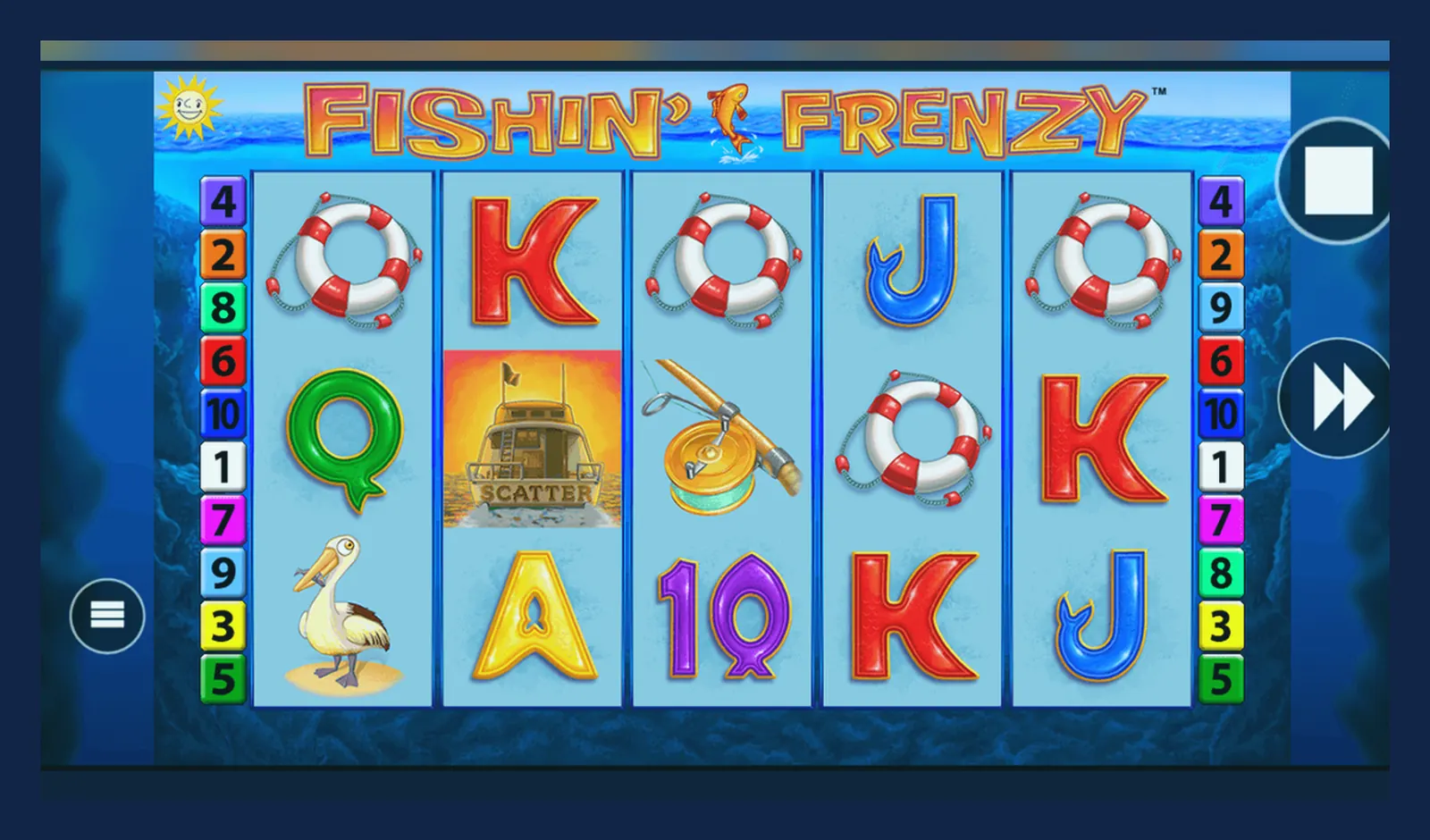
Here's what's misleading: searching «Fishin' Frenzy app download» returns dozens of results, half of them clones or repackaged demos, the other half legitimate casino operators with different licences and withdrawal times. A friend of mine installed three versions before realising none of them were the original Blueprint slot — one was a match-three game with the same name, another a social casino that paid out in tokens, not cash.
The slot itself doesn't have a standalone app. It lives inside licensed casino operators, each with their own app or web player. What you're really choosing is which UKGC-licensed site to play through, whether to install their native app, add a shortcut to your home screen, or just bookmark the browser version. This page walks through all four paths, the risks of each, and how to spot a fake before you hand over a deposit.
The Store-Style Card You'd See (If It Were a Standalone Game)
Blueprint Gaming doesn't publish Fishin' Frenzy as a separate app — it's embedded in casino platforms. But if you're comparing operator apps or trying to verify what you've downloaded, here's what a legitimate listing would look like, using aggregated data from UKGC-licensed casino apps that host the game.
If the listing shows a developer you don't recognise, no UKGC mention, or promises «unlimited coins», it's a clone. Legitimate casino apps will name the operator — Gala, Coral, Sky Vegas, etc. — and link to their UKGC licence number in the app description or footer.
What You Actually See on Screen
Whether you're in a browser, a progressive web app, or a native casino app, the game interface is nearly identical. Here's what lands on your screen once you've loaded Fishin' Frenzy and chosen your stake.
- **Loading screen**: Blueprint logo, game title, a progress bar. Takes 3–8 seconds on 4G, under 2 seconds on Wi-Fi. If it stalls or asks you to download extra files, close it and check the operator's site status.
- **Main reel view**: Five reels, four rows, bright blue water background. The fisherman sits in a dinghy on the left, pelican on the right. Stake controls sit below the reels — coin value and bet level, with the total stake displayed in GBP. The £5.00 cap (or £2.00 if you're 18–24) is enforced by the operator's system, so you won't see stakes above that threshold.
- **Paytable overlay**: Tap the small «i» icon (usually top-left or bottom-left) and you'll see the full paytable, feature rules, and RTP. Blueprint's version shows 96.00% RTP at standard settings; some operators run a lower RTP variant, which must be disclosed here.
- **Free Spins screen**: Once triggered, the background shifts to a dock scene, the fisherman casts his line, and the prize fish appear above the reels. Each fish symbol shows a multiplier. The feature plays out automatically unless you've toggled manual stops in the settings.
- **Balance and session controls**: Top-right corner shows your balance in £, with buttons for game history, sound, and the hamburger menu. Tap the menu and you'll find reality checks (mandatory pop-ups every 60 minutes under UKGC rules), deposit limits, and links to GAMSTOP if you need to self-exclude.
If the interface asks for permissions to your contacts, SMS, or camera (outside of KYC document upload), close it immediately. The game itself needs no special permissions; the operator app may ask for location to confirm you're in the UK, but nothing beyond that.
Four Ways to Install, Step by Step
Each path has a different risk profile. Browser play is the safest and slowest to load; native apps are faster but tie you to one operator; APK installs are the riskiest and almost never necessary for UK players.
- **Browser (Chrome, Safari, Firefox)**: Open the operator's site, log in or register, search for Fishin' Frenzy in the game lobby, tap to load. No install required. The game runs in HTML5 and saves no data on your phone beyond login cookies. **Risk**: Low. The site's UKGC licence is visible in the footer; if it's missing or the domain looks unfamiliar, stop and check the UKGC register. **Drawback**: Loads 2–3 seconds slower than an app, and you'll need to navigate the full casino lobby each time.
- **Add to Home Screen (Progressive Web App)**: In Safari or Chrome, load the operator's site, tap the Share icon (iOS) or the three-dot menu (Android), select «Add to Home Screen». This creates a shortcut that opens the site in a standalone window, no browser chrome. **Risk**: Low to medium. It's still the operator's web app, but if you've added the wrong domain, you won't see the usual browser warnings. Check the URL in the address bar before adding. **Benefit**: Faster launch, looks like a native app, takes up <1 MB of space.
- **Operator's Native App (Google Play or App Store)**: Search for the operator's name — «Sky Vegas», «Gala Casino», etc. — in the Play Store or App Store. Download, install, open, and register or log in. Then navigate to Fishin' Frenzy in the slots lobby. **Risk**: Medium. The app is legitimate if downloaded from an official store and the developer name matches the operator, but some casino apps have intrusive permissions (location, notifications). Check the permission list before installing. **Benefit**: Fastest load times, push notifications for bonuses, integrated payment flow.
- **APK Sideload (Android only, not recommended)**: Download an APK file from a third-party site, enable «Install from unknown sources» in Android settings, run the installer. **Risk**: High. APK files can contain malware, spyware, or modified game logic. Even if the APK is clean, you bypass the Play Store's automatic updates and security checks. UK players have no reason to sideload a casino app — every legitimate operator publishes through official stores. If a site tells you to download an APK, it's either unlicensed or a scam.
What Your Phone Needs to Run It
Fishin' Frenzy is built in HTML5, so it's less demanding than most mobile games. Here's the practical floor.
- **Operating system**: iOS 12.0 or later, Android 7.0 (Nougat) or later. Anything from the last five years will run it without stuttering.
- **RAM**: 2 GB minimum, 3 GB or more recommended if you're running other apps in the background. The game itself uses 80–120 MB of memory, but the operator's casino lobby and payment integrations add overhead.
- **Storage**: 100–150 MB free space for a native app install, under 10 MB for browser cache or a progressive web app shortcut.
- **Connection**: 3G is technically playable but frustrating — expect 8–12 second load times and occasional mid-spin freezes. 4G or Wi-Fi is the baseline for smooth play. Each spin transmits roughly 5–10 KB of data (your stake, the result, the new balance), so an hour of play uses under 5 MB, excluding the initial game load.
- **Screen**: 4.7-inch display or larger. The game scales down to smaller screens, but the paytable and feature text become hard to read on anything below 4.5 inches.
If your phone is from 2019 or later, you're fine. Older devices — iPhone 6, Samsung Galaxy S6 — will run the game but may lag during the Free Spins feature when multiple animations fire at once.
What the App Actually Does
Whether it's a native operator app or a browser session, the core function is the same: it connects you to the operator's server, which talks to Blueprint's game server. Your phone is just a display. The reels, RNG, and outcome logic all run remotely.
- **Authentication**: Logs you in using your operator account. The app stores a session token (encrypted) so you don't have to re-enter credentials every time. If you log out or the session expires (usually after 24 hours of inactivity), you'll need to log in again.
- **Game delivery**: Fetches the Fishin' Frenzy HTML5 package from Blueprint's CDN, caches the assets (graphics, sounds, paytable data) on your phone, and streams the game logic from the operator's server. The RNG result for each spin is calculated server-side and sent to your device as an encrypted packet.
- **Balance sync**: Every spin updates your balance in real time. The app queries the operator's payment system, which holds your funds in a segregated client account (UKGC requirement). Deposits and withdrawals happen through the app's payment flow, not inside the game itself.
- **Compliance tools**: Mandatory reality checks every 60 minutes (a pop-up showing how long you've played and your net win/loss), session timers, deposit limits you can set from the account page, and a direct link to GAMSTOP. These are operator responsibilities under UKGC licence conditions, so they're baked into the app or browser interface, not the game.
- **Push notifications** (native apps only): Alerts for new bonuses, deposit matches, free spins on other slots. You can disable these in the app settings or your phone's notification preferences.
The app does not and cannot alter the RTP, override the RNG, or give you an edge. The game logic is sealed on Blueprint's server. What you see on screen is a visual representation of an outcome that's already been decided remotely.
Version Notes: What Changed Recently
Blueprint updates the game client occasionally — usually to fix rendering bugs on new phone models, improve load times, or comply with new regulations. The operator app updates more frequently, and those changes affect how you access the game, not the game itself.
- **Latest game client updates** (Blueprint, rolled out across operators in late 2025 and early 2026): Reduced initial load time by ~1.5 seconds on 4G by compressing texture atlases; fixed a bug where the Free Spins feature animation would stutter on iOS 17 devices with low battery; added support for higher-contrast paytable text to meet accessibility guidelines.
- **Operator app updates** (varies by brand, typical changes in 2026): Integrated Open Banking / Trustly for faster deposits and withdrawals via Faster Payments; added stricter affordability check prompts at the £150.00 monthly net deposit threshold (now mandatory across all UKGC operators after April 2026 rule changes); improved KYC document upload flow so you can photograph your ID or proof of address in-app rather than emailing scans.
- **Regulatory prompts**: Reality checks now include a breakdown of time and money, not just a generic «You've been playing for X minutes». Some operators have added a voluntary «take a break» button that locks your account for 24 hours, separate from GAMSTOP's longer exclusion periods.
If you installed an operator's app more than six months ago, open the Play Store or App Store and check for updates. Outdated apps may not reflect the current RTP settings or could fail age-verification checks, blocking you from depositing.
Spotting a Fake Clone
There are at least a dozen apps and sites using the Fishin' Frenzy name, most of them unrelated to Blueprint. Some are harmless social casinos that pay out in tokens; others are outright scams designed to harvest payment details. Here's how to tell them apart.
- **Developer name**: Legitimate casino apps name the operator (Gala, Coral, Sky Vegas, etc.) in the developer field. If it says «Fun Games Studio» or «Casino Master Apps», it's not the real thing. Blueprint itself doesn't publish player-facing apps — they license the game to operators.
- **UKGC licence**: The app description or the operator's website footer must show a UKGC licence number (format: 000-000000-R-000000-001 or similar). Cross-check it in the UKGC register at gamblingcommission.gov.uk. If there's no licence number, the app is illegal to use in the UK and you have no recourse if they refuse to pay out.
- **Payment methods**: Real-money casino apps accept debit cards (Visa/Mastercard), PayPal, Apple Pay, Open Banking, or paysafecard. They will never ask for a credit card (banned for gambling in the UK since 2020) or cryptocurrency. If the app offers «coin packages» instead of GBP deposits, it's a social casino, not real-money play.
- **Permissions**: The game needs no special permissions. The operator app may ask for location (to confirm you're in the UK), camera (for KYC document upload), and notifications (for bonuses). If it requests access to contacts, SMS, phone logs, or storage beyond the KYC folder, reject it and uninstall immediately.
- **Pricing and in-app purchases**: Legitimate casino apps are free to download. In-app purchases are labelled as deposits, starting from £10.00. If the app costs £2.99 upfront or offers «VIP membership for £9.99/month», it's not a licensed operator.
- **Graphics and branding**: Blueprint's Fishin' Frenzy has a specific look — bright blue water, cartoon fish, a red-bearded fisherman in a yellow hat. Clones often use similar but off-model art (different fisherman, darker palette, realistic fish). If the loading screen doesn't show the Blueprint logo, you're not playing the original.
The First Withdrawal: Why It Takes Longer Than You Expect
You've won, you've requested a withdrawal, and the app says «pending». Here's why it's not instant, and what the operator is actually doing behind the scenes.
- **KYC verification**: The first withdrawal triggers a manual check of your identity documents (passport or driving licence) and proof of address (bank statement, utility bill, council tax letter — all dated within the last three months). The operator must verify you're over 18, resident in the UK, and the payment method is in your own name. This takes 24–48 hours, sometimes 72 if the documents are unclear or you submitted them outside business hours.
- **Affordability checks**: If your deposits have crossed the £150.00 monthly threshold, the operator runs a credit-reference check (via Experian, TransUnion, or Equifax) to confirm you can afford the spend. This is now mandatory under UKGC rules revised in April 2026. If the check flags a concern, they'll ask for bank statements or payslips. That adds another 1–3 days.
- **Payment processing**: Once approved, e-wallet withdrawals (PayPal, Skrill) arrive in a few hours; Faster Payments to your bank account take same-day to 2 working days; debit card withdrawals take 1–3 working days. Subsequent withdrawals are faster because your account is already verified, but the first one is always the slowest.
- **Wagering requirements**: If you claimed a welcome bonus, you'll need to wager the bonus amount (and sometimes the deposit too) a set number of times before you can withdraw. A £10.00 bonus with 35× wagering means you need to place £350.00 in total stakes before the funds become withdrawable. The app or site will show your progress, but if you try to cash out early, the bonus and any winnings from it are forfeited.
This isn't the operator stalling — it's UKGC licence conditions. A mate of mine requested a £200.00 withdrawal on a Friday evening and didn't see the money until Tuesday afternoon because he'd uploaded a bank statement with his middle name, but his account was registered with just his first and surname. The operator froze the withdrawal until he sent a new document. Moral: register with the exact name on your bank account and have your documents ready before you deposit.
FAQ
Can I download Fishin' Frenzy as a standalone app?
No. Blueprint Gaming licenses Fishin' Frenzy to casino operators; it doesn't exist as a separate app. You'll play it through a UKGC-licensed operator's app or website. If you see a standalone «Fishin' Frenzy» app in the store, it's either a clone, a social casino, or a different game using the same name.
Is it safe to add the casino site to my home screen instead of installing the full app?
Yes, and it's often the better choice. A progressive web app shortcut uses minimal storage, loads nearly as fast as a native app, and doesn't request intrusive permissions. Just confirm the URL matches the operator's official domain before adding it — check the UKGC register if you're unsure.
Why does the app ask for my location and ID documents?
Location checks confirm you're in the UK (UKGC operators can only serve UK residents). ID and proof of address are mandatory for KYC — the operator must verify your age and identity before your first withdrawal. If the app asks for more than location, camera (for document upload), and notifications, review the permissions list and consider using the browser version instead.
My withdrawal is stuck at «pending» — is that normal for the first time?
Yes. The first withdrawal requires manual KYC checks (ID, proof of address, affordability review if you've deposited over £150.00 in a month). Expect 24–72 hours. Subsequent withdrawals are faster because your account is already verified. If it's been longer than three days, contact the operator's support and ask for a status update — they're required to process withdrawals within a reasonable timeframe under UKGC rules.